TL;DR
- First notice of loss (FNOL) automation turns incoming loss reports — emails, ACORD loss notices, adjuster notes, photos, attachments — into structured claim data and consistent intake summaries, without manual re-keying.
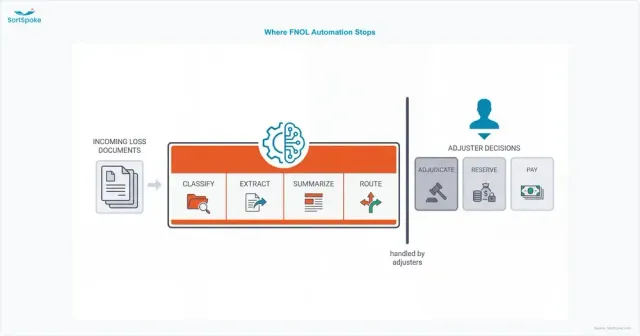
- It covers four functions: classifying what arrived, extracting the loss details, creating the intake summary, and routing the claim to the right queue. It does not adjudicate claims, set reserves, or make payout decisions.
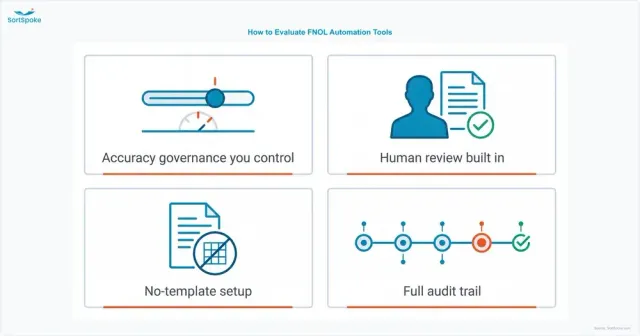
- Evaluate tools on four criteria: accuracy governance you control, human review built into the workflow, no-template setup, and a full audit trail.
- Proof it works: SCM Insurance Services processes FNOL forms and other claims documents 80% faster with AI extraction running under its own team's review.
What Is First Notice of Loss (FNOL) Automation?
First Notice of Loss (FNOL) Automation
First notice of loss (FNOL) automation — software that converts incoming loss reports into structured claim data automatically. When a loss is reported by email, form, photo, or attachment, the system classifies each document, extracts the claim details (who, what, when, where, which policy), generates a consistent intake summary, and routes the claim to the right team.
FNOL automation operates at the document layer of claims intake. It does not adjudicate claims, set reserves, or make payout decisions — those stay with adjusters and claims systems. Its job is to make sure the claim record those people work from is complete, accurate, and available in minutes instead of days.
The first notice is where claim data quality is decided. Every re-keyed field can be mistyped, and every hour a loss report sits in a shared inbox adds cycle time — on the one interaction where policyholders are paying closest attention.
The FNOL Intake Mess: What Actually Arrives
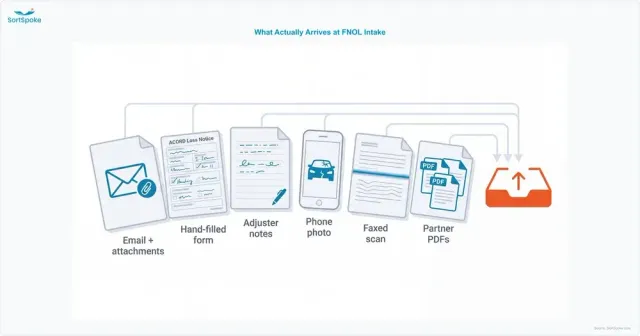
If first notices arrived as one tidy form, nobody would be searching for tools to automate them. What claims teams actually receive looks more like this:
- Emails with attachments — a broker or agent forwards the insured's message with a loss notice, photos, and a police report attached, and half the critical detail sits in the email body itself
- ACORD loss notice forms — sometimes typed, often hand-filled, sometimes a photo of a printout
- Adjuster and agent notes — field notes, margin comments, and narrative descriptions in no standard structure
- Phone photos — vehicle damage, water-stained ceilings, storm debris, sent straight from the scene
- Scanned and faxed documents — still a daily reality for many agency and TPA relationships
- PDFs in every format — every TPA, program administrator, and trading partner has its own layout
Phone remains a major FNOL channel too. Calls produce recordings, transcripts, and call-center notes, and some intake platforms specialize in converting that voice channel into structured loss reports. The document side is the other half of the problem — and for commercial lines, usually the bigger half: the loss notice, the supporting attachments, and the correspondence that follows.
Volume makes it worse at exactly the wrong moments. A manual intake process that keeps up in a normal week falls days behind in a catastrophe week — when speed matters most.
What FNOL Document Automation Covers
Credible FNOL document automation does four jobs, in sequence:
- Classification. Identify what each incoming document is — loss notice, photo, police report, correspondence — split multi-document packages into their parts, and catch duplicates, like the same loss reported by both the insured and the agent.
- Extraction. Pull the claim-critical fields into structured data: insured and claimant details, policy number, date, time and location of loss, loss description, and reported damage. Because loss reports arrive in endlessly varied layouts, this has to work without a template for every format.
- Summary creation. Assemble the extracted data into a consistent intake summary, so an adjuster opens the same layout every time — regardless of whether the source was a hand-filled form, an email thread, or a stack of photos.
- Routing. Apply rules to the extracted data to send the claim where it belongs: the right line of business, the right severity queue, the right jurisdiction, the right reviewer — with escalation when something looks urgent.
The difference this makes at the intake desk:
| Intake step |
Manual FNOL handling |
FNOL document automation |
| Sorting what arrived |
Someone opens every email and attachment and decides what it is |
Documents are classified and split on arrival; duplicates are flagged |
| Getting data into the claims system |
Re-keyed field by field from the source documents |
Extracted into structured fields; staff review instead of retype |
| Intake summary |
Written by hand, in whatever format the coordinator uses |
Generated from extracted data in one consistent format |
| Assignment |
Judgment call from a queue, claim by claim |
Rules on the extracted data route each claim automatically |
| Catastrophe surge |
Backlog grows until people catch up |
Processing scales with volume; reviewers focus on exceptions |
How to Evaluate FNOL Automation Tools
The queries that lead people here — "best tools," "where to buy" — deserve a straight answer: the vendor category is intelligent document processing (IDP) built for insurance, and the tools worth shortlisting separate themselves on four criteria.
Accuracy governance you control
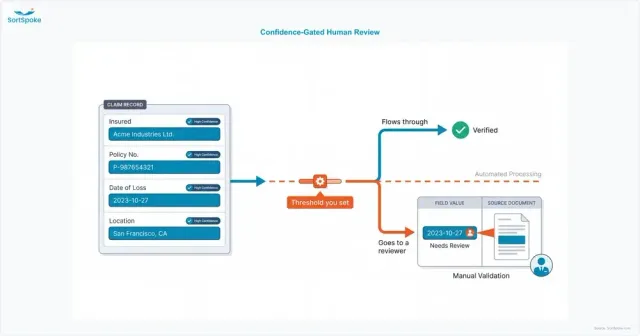
Extraction will never be uniformly perfect across hand-filled forms, phone photos, and clean PDFs — so the question isn't "what accuracy number does the vendor quote," it's "what happens when confidence is low." Look for field-level confidence scores and thresholds you set: high-confidence fields flow through automatically, low-confidence fields go to a person. Be skeptical of any single accuracy figure quoted without its measurement basis.
Human review built in, not bolted on
When a field does need checking, the reviewer should see the extracted value next to the source document, click through to exactly where it came from, and correct it in seconds. If review means opening the PDF in another window and eyeballing both screens, the tool has automated the easy part and kept the painful part.
No-template setup
FNOL formats are too varied for template-based extraction — every TPA, agent, and trading partner sends something different, and hand-filled forms defeat fixed layouts entirely. A new format should work the day it arrives, not after a configuration project.
A full audit trail
Claims data feeds regulatory reporting, reinsurance recoveries, and litigation. Every extracted field should stay traceable to its exact source location in the original document, and every action — upload, extraction, review, correction, export — should be logged with who did it and when.
How SortSpoke Handles FNOL Documents
SortSpoke is an insurance-trained document extraction platform with human-in-the-loop AI at its core — and claims intake is one of the workflows it was built for. First notices arrive from agents, adjusters, and insureds in forms, emails, and photos; SortSpoke captures the claim details from whichever format shows up:
- Insurance-trained FNOL extraction models capture claimant information, loss details, coverage, and date and location data from FNOL documents, emails, and forms — starting from SortSpoke's pretrained models for FNOL, ACORD forms and other insurance document types, then learning your own forms from a handful of accepted examples
- Every common intake format is fair game — PDFs, Word and Excel files, scans and phone photos, and email files with their attachments — with OCR running automatically on arrival and image-to-text for photos from the field
- Classification and splitting turn a multi-document loss package into separate, classified documents, with duplicate detection catching the same loss reported twice
- Confidence-based review puts your team in control: every extracted field carries a confidence score, thresholds you configure decide what flows through automatically, and everything below threshold goes to your reviewers in an interface that shows each field next to its source
- Summaries and structured output — extracted data can generate a consistent claim summary in your format and deliver structured records to your claims system through APIs and integrations
- Traceability throughout — every field stays linked to its source location, and every action on every document is logged for audit
This is claims-document automation with governance built in — the same architecture SortSpoke applies across its intelligent document processing platform for underwriting and claims teams alike.
Customer Success: SCM Insurance Services
SCM processes thousands of insurance claims in constantly varying document formats. Manual data entry created bottlenecks in processing FNOL forms — and traditional OCR couldn't handle the variety. With SortSpoke's AI extraction working alongside RPA, SCM went live in 8–12 weeks and now processes claims documents 80% faster, with the capacity to absorb claim surges during natural disasters.
Read how SCM automated its claims document processing →
Frequently Asked Questions
What does FNOL stand for in insurance?
FNOL stands for first notice of loss — the initial report to an insurer that a loss, accident, or damage has occurred. It is the first step in the claims process, and the documents it generates (loss notice forms, emails, photos, adjuster notes) become the foundation of the claim file.
What is the difference between FNOL automation and claims automation?
FNOL document automation covers the intake layer: classifying incoming loss documents, extracting the claim data, creating summaries, and routing the claim. Claims automation is a broader category that can extend into adjudication, reserving, and settlement decisions. FNOL document automation deliberately stops short of those decisions — it prepares accurate claim data so adjusters and claims systems can make them.
Can FNOL automation handle scanned documents, photos, and handwritten forms?
Modern FNOL document automation is built for exactly those inputs. SortSpoke, for example, runs OCR automatically on every arriving document — scanned PDFs, faxed forms, and phone photos — and hand-filled entries are confirmed by your reviewers like any other field, so the format a first notice arrives in doesn't determine how fast it gets processed.
How do small MGAs and TPAs use FNOL document automation?
Smaller teams face the same document variety as large carriers but with far fewer people to absorb it, so no-template setup matters most: a tool should handle a new trading partner's format without a configuration project. Most start with a single high-volume document type, keep review in their own team's hands, and deliver the structured output into the claims or policy system they already use.
Key Takeaways
1
First notice of loss (FNOL) automation operates at the document layer of claims intake — classification, extraction, summary creation, and routing — not adjudication or payout decisions.
2
The intake mess is the real problem: emails, ACORD loss notices, adjuster notes, photos, and scans in every format, with volume spiking exactly when catastrophes hit.
3
Shortlist tools on four criteria: accuracy governance you control, human review built into the workflow, no-template setup, and a complete audit trail.
4
SortSpoke applies pretrained FNOL models, automatic OCR, and confidence-gated human review to claims documents — the approach behind SCM's 80% faster claims document processing.
See how SortSpoke extracts FNOL data from your real claims documents — with your team reviewing every field that matters. Book a demo →


